
Reliable Power Starts with the Right UPS
For businesses that depend on servers, networking equipment, industrial controls, security systems or other sensitive electrical equipment, power interruptions can have serious consequences.
A UPS—Uninterruptible Power Supply—provides a critical layer of protection by maintaining power to connected equipment when the utility supply is interrupted or becomes unstable.
But selecting a UPS is not simply a matter of choosing a capacity in kVA.
The right system must match the load, application, required runtime, redundancy, installation environment and future expansion plans.
At Allied Power EG, we help customers evaluate these factors and develop reliable critical-power solutions tailored to their facilities.
1. Understand Your Critical Load
The first step is to determine exactly what equipment needs UPS protection.
Typical critical loads include:
- Servers
- Network switches
- Storage systems
- Telecommunications equipment
- Industrial control systems
- Security systems
- Medical equipment
- Building management systems
- Automated production equipment
- Emergency and monitoring systems
Not every electrical load necessarily requires UPS protection.
Separating critical loads from non-critical loads can help optimize the UPS system and avoid unnecessary investment.
The key question is:
What equipment must remain operational if utility power is lost?
2. Determine the Required UPS Capacity
UPS systems are commonly rated in VA or kVA, but selecting capacity based only on the current load can create problems later.
A proper assessment should consider:
Current Load
Measure or calculate the actual operating load.
Peak Load
Some equipment can have higher startup or transient requirements.
Power Factor
Modern UPS systems and loads may have different kW/kVA characteristics.
Future Expansion
If your facility is expected to add servers, machines or other equipment, the UPS should have appropriate capacity for growth.
Recommended Approach
Instead of designing a UPS to operate continuously at its maximum capacity, engineers generally allow an appropriate operating margin.
For example, if the critical load is approximately 80 kW, selecting a UPS system with additional capacity can provide flexibility for future expansion and operational changes.
The exact sizing should always be determined from the actual application.
3. Choose the Appropriate UPS Technology
Different applications require different UPS architectures.
Online Double-Conversion UPS
For critical applications, online double-conversion UPS systems are widely used because the load is continuously supplied through the UPS conversion system.
They are particularly suitable for:
- Data centers
- Server rooms
- Industrial control
- Telecommunications
- Financial infrastructure
- Healthcare
- Mission-critical facilities
Modular UPS
Modular systems can provide additional flexibility by allowing power modules to be added as requirements grow.
They can also support redundancy strategies and simplify capacity expansion.
Single-Phase UPS
Single-phase UPS systems are often suitable for smaller loads such as:
- Individual servers
- Network equipment
- Workstations
- Security equipment
- Small IT environments
4. Battery Runtime Matters
A UPS protects equipment immediately when power is interrupted, but the duration of backup depends largely on the battery system.
Consider the question:
How long should the equipment remain powered?
Requirements may range from a few minutes to significantly longer periods.
The required autonomy depends on the application.
For example:
Short runtime
May provide enough time for controlled shutdown of IT equipment.
Medium runtime
May provide time for a standby generator to start and assume the load.
Extended runtime
May be required for applications where longer autonomous operation is necessary.
Battery capacity should therefore be designed together with the UPS—not treated as an afterthought.
5. UPS + Generator: A Powerful Combination
For critical facilities, a UPS and generator often work together.
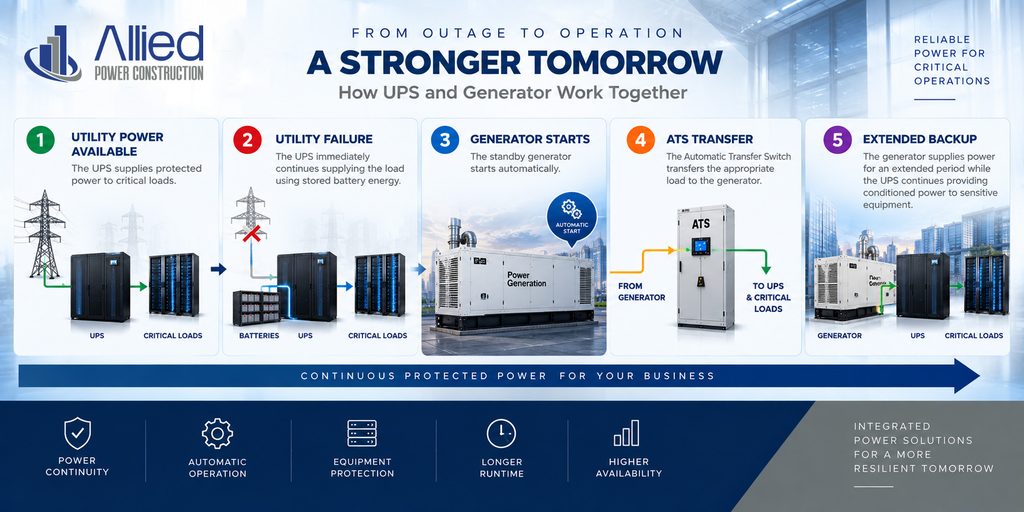
This architecture combines instantaneous power continuity with long-duration backup capability.
6. Consider Redundancy
For mission-critical environments, a single UPS may not provide the desired level of availability.
Redundancy can be designed in several ways depending on the application.
Examples include: N+1
The system includes one additional UPS module beyond the capacity required to support the load.
Distributed Redundancy
Multiple UPS systems can be arranged to support critical loads according to the facility architecture.
Dual Power Paths
Some data center and IT environments use independent power paths to increase resilience.
The correct architecture depends on the required availability and the business impact of downtime.
7. Don’t Forget the Electrical Infrastructure
A UPS does not operate in isolation.
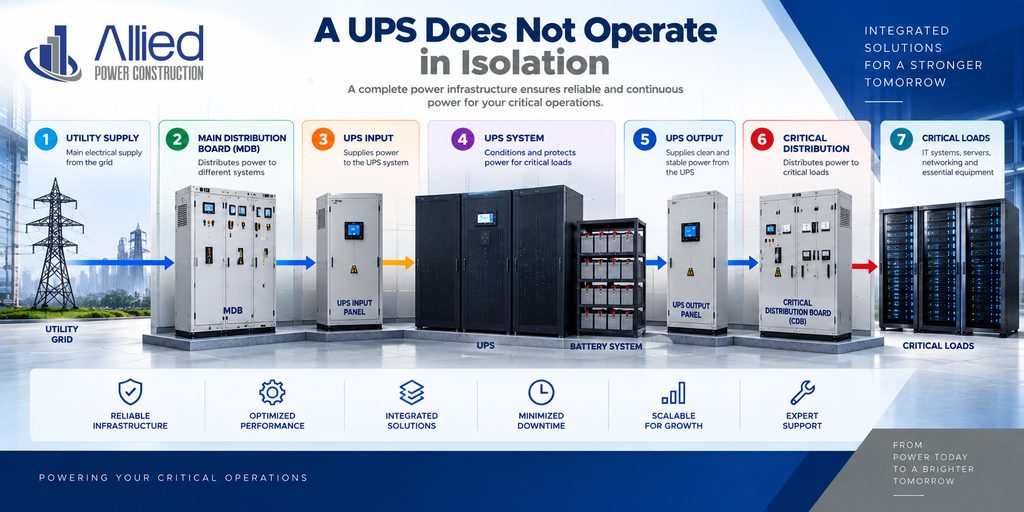
The installation may also require:
- Maintenance bypass
- Input/output breakers
- Distribution boards
- ATS
- Generator integration
- Surge protection
- Monitoring
- Battery cabinets
- Environmental monitoring
Proper coordination between these systems is essential.
8. Battery Environment and Maintenance
Battery performance can be affected by environmental and operational conditions.
Important considerations include:
- Ambient temperature
- Ventilation
- Installation arrangement
- Charging conditions
- Battery age
- Number of charge/discharge cycles
- Maintenance procedures
Regular inspection and testing can help identify deteriorating batteries before they become a critical failure point.
Remember:
A UPS can be perfectly operational while its batteries are no longer capable of providing the required backup.
That is why battery maintenance should be part of the overall critical-power strategy.
9. Monitoring Is Increasingly Important
Modern UPS systems can provide detailed operational information.
Depending on the equipment and configuration, monitoring can include:
- Input voltage
- Output voltage
- Load percentage
- Battery status
- Battery voltage
- Temperature
- Alarm conditions
- Runtime estimates
- System status
For critical environments, integration with facility monitoring or network management systems can provide better visibility.
This allows technical teams to identify abnormal conditions before they develop into failures.
10. Plan for the Future
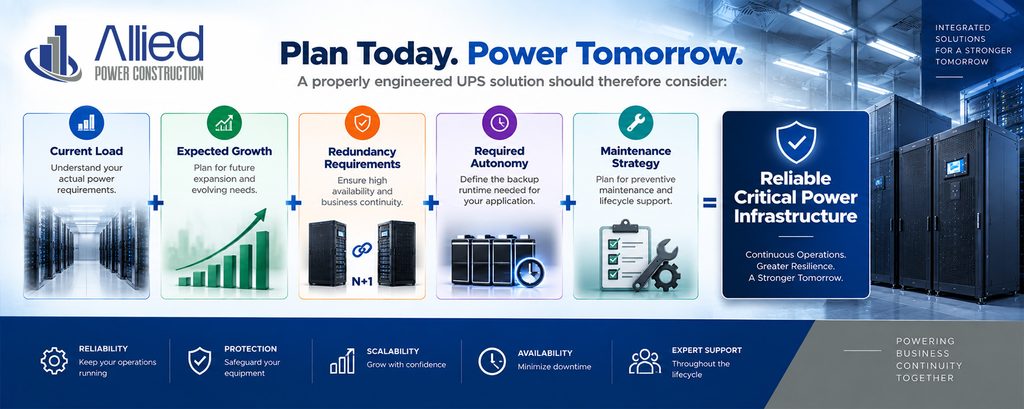
One of the most common mistakes in power infrastructure is designing only for today’s requirements.
Your business may grow.
Your server capacity may increase.
Production equipment may be added.
Security systems may expand.
A properly engineered UPS solution should therefore consider:
Allied Power EG: From UPS Selection to Complete Integration
At Allied Power EG, we approach UPS projects as complete infrastructure projects rather than simply equipment supply.
Our support can include:
Site Survey
Assessment of existing electrical infrastructure and critical loads.
Load Analysis
Determining current and expected power requirements.
UPS Selection
Selecting an appropriate UPS architecture and capacity.
Battery Design
Determining the required battery capacity and autonomy.
Generator Integration
Connecting UPS, generator and ATS systems into a coordinated backup-power architecture.
Installation
Professional installation and system integration.
Testing & Commissioning
Verifying system operation under appropriate operating conditions.
Maintenance
Preventive maintenance, battery testing and technical support.
Conclusion
Choosing a UPS is ultimately about more than selecting a kVA rating.
A reliable solution must consider the entire power environment:
Load → UPS → Batteries → Distribution → Generator → ATS → Monitoring → Maintenance
When these systems are properly engineered together, businesses can significantly improve power continuity and protect critical operations against unexpected electrical interruptions.